
Question 1
Refer to the exhibit.
SW1#
Name: Et0/0
Switchport: Enabled
Administrative Node: trunk
Operational Mode: trunk
Administrative Trunking Encapsulation: dot1q
Operational Trunking Encapsulation: dot1q
Negotiation of Trunking: On
Access Mode VLAN: 1 (default)
Trunking Native Mode VLAN: 1 (default)
Administrative Native VLAN tagging: enabled
Voice VLAN: none
Administrative private-vlan host-association: none
Administrative private-vlan mapping: none
Administrative private-vlan trunk native VLAN: none
Administrative private-vlan trunk Native VLAN tagging: enabled
Administrative private-vlan trunk encapsulation: dot1q
Administrative private-vlan trunk normal VLANs: none
Administrative private—vlan trunk associations: none
Administrative private-vlan trunk mappings: none
Operational private-vlan: none
Trunking VLANs Enabled: 1,22
Pruning VLANs Enabled: 2-1001
Capture Mode Disabled
Capture VLANs Allowed: ALL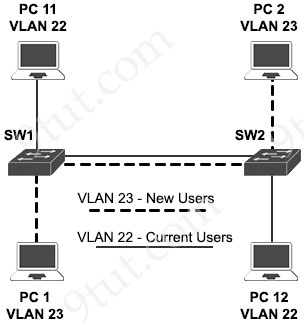
VLAN 23 is being implemented between SW1 and SW2. The command show interface ethernet0/0 switchport has been issued on SW1. Ethernet0/0 on SW1 is the uplink to SW2. Which command when entered on the uplink interface allows PC 1 and PC 2 to communicate without impact to the communication between PC 11 and PC 12?
A. switchport trunk allowed vlan 2-1001
B. switchport trunk allowed vlan add 23
C. switchport trunk allowed vlan 23
D. switchport trunk allowed vlan 22-23
Answer: B
정답은 B. switchport trunk allowed vlan add 23입니다.
1. 문제 상황 분석
- 현재 상태: show interface ethernet0/0 switchport 출력 결과를 보면, 현재 트렁크 포트에서 허용된 VLAN은 1, 22입니다 (Trunking VLANs Enabled: 1, 22).
- 목표: 새로운 VLAN 23을 추가하여 PC 1과 PC 2가 통신하게 만들어야 합니다.
- 제약 조건: 기존에 통신 중인 PC 11과 PC 12(VLAN 22)의 통신에 영향이 없어야 합니다.
2. 왜 ‘add’ 키워드가 중요한가요?
Cisco 스위치에서 switchport trunk allowed vlan 명령어를 사용할 때의 동작 방식을 이해하는 것이 정답의 핵심입니다.
- switchport trunk allowed vlan 23 (C번 방식):
- 결과: 기존에 허용되었던 모든 VLAN(1, 22)이 삭제되고, 오직 23번만 남게 됩니다.
- 영향: VLAN 22를 사용하는 PC 11과 PC 12의 통신이 즉시 끊어집니다. (제약 조건 위반)
- switchport trunk allowed vlan add 23 (B번 방식):
- 결과: 기존의 목록(1, 22)은 그대로 두고, 여기에 23번을 추가합니다. 결과적으로 1, 22, 23이 허용됩니다.
- 영향: 기존 통신을 방해하지 않으면서 새로운 VLAN만 활성화합니다. (정답)
3. 다른 보기 분석
- A. switchport trunk allowed vlan 2-1001: 2번부터 1001번까지 모두 허용한다는 뜻입니다. 23번은 포함되겠지만, 보안상 불필요한 VLAN까지 모두 열어버리며 기존 설정(1번 제외 등)을 덮어쓰므로 부적절합니다.
- D. switchport trunk allowed vlan 22-23: 22번과 23번을 허용합니다. 하지만 이 역시 덮어쓰기 방식이므로, 만약 기존에 1번(Native VLAN 등)이 필요했다면 설정이 꼬일 수 있습니다. 가장 안전하고 정확한 방법은 add를 사용하는 것입니다.
Question 2
Which default condition must be considered when an encrypted mobility tunnel is used between two Cisco WLCs?
A. The tunnel uses the EoIP protocol to transmit data traffic.
B. TCP port 443 and UDP 21 are used.
C. The tunnel uses the IPsec protocol for encapsulation.
D. Control and data traffic encryption are enabled.
Answer: D
1. Cisco Mobility Tunnel 이란?
서로 다른 WLC에 연결된 AP 사이를 클라이언트가 이동할 때(로밍), 세션을 유지하기 위해 두 WLC 사이에 형성되는 논리적인 통로입니다. 최신 Cisco WLC 환경에서는 주로 CAPWAP 프로토콜을 사용하여 이 터널을 형성합니다.
2. 정답 분석: 왜 D번인가요?
Cisco WLC에서 ‘Encrypted Mobility Tunnel'(암호화된 이동성 터널) 기능을 활성화하면 다음과 같은 기본 동작이 수행됩니다.
- 동시 암호화: 제어 평면(Control Plane) 트래픽뿐만 아니라 실제 사용자 데이터가 흐르는 데이터 평면(Data Plane) 트래픽까지 모두 암호화가 기본적으로 활성화됩니다.
- 보안 표준: 보통 DTLS(Datagram Transport Layer Security)를 사용하여 터널 내부의 정보를 보호합니다.
3. 오답 분석
- A. The tunnel uses the EoIP protocol…
- 설명: 과거(Legacy) 방식인 AireOS 구버전에서는 EoIP(Ethernet over IP)를 사용했으나, 암호화된 터널은 주로 CAPWAP 기반의 DTLS를 사용합니다.
- B. TCP port 443 and UDP 21 are used.
- 설명: Mobility 통신에는 UDP 16666(비암호화) 또는 UDP 16667(암호화/DTLS) 포트가 사용됩니다. 포트 21(FTP)이나 443(HTTPS)은 관련이 없습니다.
- C. The tunnel uses the IPsec protocol…
- 설명: WLC 간 이동성 터널 보안에는 IPsec 대신 DTLS 프로토콜이 표준으로 사용됩니다.
Question 3
Why are API keys used to enforce rate limiting?
A. to uniquely identify clients to monitor their usage patterns
B. to encrypt data to prevent excessive usage
C. to contain embedded permissions that automatically expire
D. to track the geographical location of each request
Answer: A
1. API Key와 Rate Limiting의 정의
- API Key: 서버가 어떤 클라이언트(사용자 또는 앱)가 요청을 보냈는지 식별하기 위해 발급하는 고유한 식별자입니다.
- Rate Limiting: 특정 시간 동안 클라이언트가 보낼 수 있는 요청의 횟수를 제한하는 기술입니다. (예: 분당 60회 요청 가능)
2. 정답 분석: 왜 A번인가요?
서버가 속도 제한을 걸려면 ‘누가’ 요청을 보내고 있는지 알아야 합니다.
- 고유 식별: API Key를 통해 각 요청이 어떤 클라이언트로부터 왔는지 유니크하게 식별할 수 있습니다.
- 사용량 모니터링: 식별된 클라이언트별로 현재까지 몇 번의 요청을 썼는지 사용 패턴을 추적하여, 정해진 한도를 초과하면 추가 요청을 거부(Block)할 수 있습니다.
3. 오답 분석
- B. to encrypt data… (데이터 암호화): API Key는 식별을 위한 것이지 데이터 자체를 암호화하는 도구(SSL/TLS 등)가 아닙니다.
- C. to contain embedded permissions… (내장된 권한 및 자동 만료): 이는 주로 **JWT(JSON Web Token)**나 OAuth 토큰의 특징입니다. 일반적인 API Key는 단순한 식별 문자열인 경우가 많습니다.
- D. to track the geographical location… (지리적 위치 추적): 위치 추적은 클라이언트의 IP 주소를 통해 이루어지며, API Key의 주된 목적은 아닙니다.
Question 4
What are two behaviors of a point-to-point WAN topology? (Choose two)
A. It uses a single router to route traffic between sites.
B. It leverages a dedicated connection.
C. It connects remote networks through a single line.
D. t delivers redundancy between the central office and branch offices.
E. It provides direct connections between each router in the topology.
Answer: B C
Question 5
Refer to the exhibit.
AMDP2_FE-5-COLL: AMDP2/FE 0/0/ [DEC] , Excessive collisions, TDR=[DEC] , TRC=[DEC]
%DEC21140-5-COLL: [chars] excessive collisions
%ILACC-5-COLL: Unit [DEC], excessive collisions. TDR=[DEC]
%LANCE—5-COLL: Unit [DEC], excessive collisions. TDR=[DEC]
%PQUICC-5-COLL: Unit [DEC], excessive collisions. Retry limit [DEC] exceeded
%PQUICC_ETHER-5-COLL: Unit [DEC], excessive collisions. Retry limit [DEC] exceededWhat is occurring on this switch?
A. A high number of frames smaller than 64 bytes are received.
B. Frames are dropped after 16 failed transmission attempts.
C. The internal transmit buffer is overloaded.
D. An excessive number of frames greater than 1518 bytes are received.
Answer: B
1. 로그 메시지 분석
전시된 로그(Exhibit)를 보면 다음과 같은 핵심 문구들이 반복됩니다:
- “Excessive collisions” (과도한 충돌 발생)
- “Retry limit exceeded” (재시도 횟수 제한 초과)
이 로그들은 스위치가 프레임을 전송하려고 했으나, 계속되는 충돌로 인해 전송에 실패했음을 나타냅니다.
2. 이더넷의 재시도 메커니즘 (Retry Mechanism)
표준 이더넷(CSMA/CD 방식)에서는 데이터 전송 중 충돌이 발생하면 다음과 같은 절차를 거칩니다:
- 충돌이 감지되면 전송을 중단하고, 잼 신호(Jam Signal)를 보내 다른 장비들에게 충돌을 알립니다.
- 백오프(Backoff) 알고리즘에 따라 임의의 시간을 기다린 후 재전송을 시도합니다.
- 이 재시도는 최대 16번까지 반복됩니다.
- 16번의 시도 후에도 계속 충돌이 발생하면, 스위치는 해당 프레임 전송을 포기하고 **프레임을 폐기(Drop)**합니다. 이때 발생하는 로그가 바로 문제에 나온 “Retry limit exceeded”입니다.
3. 오답 분석
- A. frames smaller than 64 bytes (Runts): 이는 너무 짧은 프레임(Runts)에 대한 설명이며, 충돌 로그와는 직접적인 상관이 없습니다.
- C. internal transmit buffer is overloaded: 버퍼 오버로드는 보통 ‘Output drops’로 기록되며, 충돌(Collision)과는 다른 개념입니다.
- D. frames greater than 1518 bytes (Giants): 이는 너무 큰 프레임(Giants)에 대한 설명입니다.
💡 원인과 해결책
이런 “Excessive collisions”는 주로 다음과 같은 상황에서 발생합니다:
- Duplex Mismatch: 한쪽은 Full-Duplex, 한쪽은 Half-Duplex로 설정된 경우 가장 흔하게 발생합니다.
- 케이블 불량: 물리적인 케이블 문제로 신호 간섭이 생길 때 발생합니다.
- 네트워크 과부하: Half-Duplex 환경에서 트래픽이 너무 많을 때 발생합니다.
Question 6
Which technology allows multiple operating systems to run a single physical server?
A. cloud computing
B. virtualization
C. application hosting
D. containers
Answer: B
Question 7
Which security element uses a combination of one-time passwords, a login name, and a personal smartphone?
A. software-defined segmentation
B. multifactor authentication
C. attribute-based access control
D. rule-based access control
Answer: B
Question 8
Refer to the exhibit.
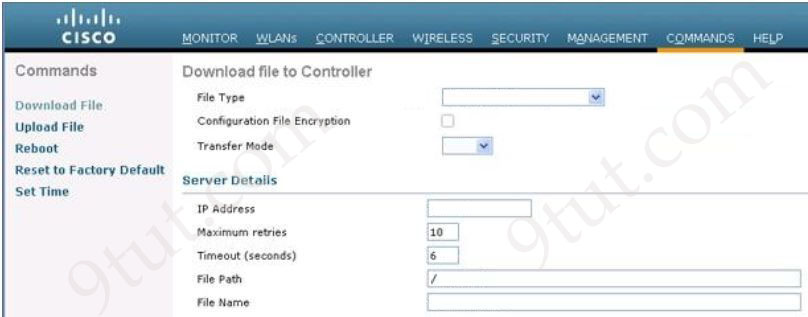
Which tasks must be performed on the Download File tab to install new software using TCP port 22?
A. Set the File Type to Code, set the Transfer Mode to SFTP, and specify the IP address of the WLC.
B. Set the File Type to Configuration, set the Transfer Mode to FTP, and specify the IP address of the file server.
C. Set the File Type to Code, set the Transfer Mode to SFTP, and specify the IP address of the file server.
D. Set the File Type to Configuration, set the Transfer Mode to SFTP, and specify the IP address of the WLC.
Answer: C
1. 문제 요구사항 분석
- 목표: 새로운 소프트웨어(New Software)를 설치.
- 조건: TCP 포트 22를 사용해야 함.
2. 정답 핵심 풀이
- File Type → Code:WLC에서 운영체제나 펌웨어 같은 실행 소프트웨어를 업데이트할 때는 파일 타입을 ‘Code’로 설정해야 합니다. ‘Configuration’은 설정 값을 백업하거나 복구할 때 사용합니다.
- Transfer Mode → SFTP (TCP 포트 22):문제에서 제시한 TCP 22번 포트는 보안 파일 전송 프로토콜인 SFTP(SSH File Transfer Protocol)가 사용하는 표준 포트입니다. 따라서 전송 모드를 SFTP로 선택해야 합니다.
- 참고: FTP는 21번, TFTP는 69번, HTTP는 80번 포트를 사용합니다.
- IP Address → File Server의 IP: WLC가 소프트웨어 파일을 가져올 대상(Source)인 파일 서버의 IP 주소를 입력해야 합니다. WLC 자신의 IP를 입력하면 안 됩니다.
3. 주요 전송 프로토콜 및 포트 요약
WLC 유지관리 시 사용하는 프로토콜과 포트 번호를 정리하면 다음과 같습니다.
| 프로토콜 | 전송 모드 설정 | 포트 번호 | 특징 |
| SFTP | SFTP | TCP 22 | 암호화 전송 (보안) |
| FTP | FTP | TCP 21 | 일반 파일 전송 |
| TFTP | TFTP | UDP 69 | 단순 파일 전송 (가장 흔히 사용) |
| HTTP | HTTP | TCP 80 | 웹 브라우저 기반 전송 |
4. 오답 분석
- A: 파일 서버가 아닌 WLC의 IP 주소를 지정하라고 했으므로 틀렸습니다.
- B: 파일 타입을 ‘Configuration’으로 설정했고, 전송 모드를 FTP(포트 21)로 설정했으므로 틀렸습니다.
- D: 파일 타입을 ‘Configuration’으로 설정했으며, IP 주소를 WLC로 지정했으므로 틀렸습니다.
Question 9
Which role do predictive AI models play in network load balancing?
A. They anticipate future traffic spikes.
B. They assign IP addresses to devices.
C. They select correct cabling types for deployment.
D. They solely monitor historical traffic volumes.
Answer: A
1. 로드 밸런싱(Load Balancing)과 AI
기본적으로 로드 밸런싱은 네트워크 트래픽을 여러 서버나 경로로 분산하여 특정 장비에 과부하가 걸리지 않도록 하는 기술입니다. 여기에 예측형 AI(Predictive AI) 모델이 결합되면 단순히 ‘현재’ 상태에 대응하는 것을 넘어 ‘미래’를 대비하게 됩니다.
- 미래 트래픽 예측: 과거의 데이터 패턴(요일별, 시간별, 이벤트별 트래픽 변화)을 학습하여, 앞으로 발생할 트래픽 급증(Spikes) 시점을 미리 예상합니다.
- 선제적 자원 할당: 트래픽이 몰리기 전에 미리 대역폭을 확보하거나 가상 서버를 추가로 가동하는 등의 조치를 취할 수 있습니다.
2. 정답 분석
- A. They anticipate future traffic spikes (미래 트래픽 급증 예측): AI 모델의 핵심 기능인 ‘예측(Prediction)’을 정확히 설명하고 있습니다. 이를 통해 네트워크 지연을 사전에 방지할 수 있습니다.
3. 오답 분석
- B. They assign IP addresses to devices: IP 주소를 할당하는 것은 DHCP(Dynamic Host Configuration Protocol)의 역할입니다. AI 모델의 주요 역할이 아닙니다.
- C. They select correct cabling types for deployment: 케이블 종류(광케이블, UTP 등)를 선택하는 것은 네트워크 설계 단계에서 엔지니어가 결정하는 물리적 계층(Layer 1)의 작업입니다.
- D. They solely monitor historical traffic volumes: AI는 과거 데이터를 모니터링하는 것에만 그치지 않고, 그 데이터를 바탕으로 미래를 예측하는 것이 존재 이유입니다. 단순히 모니터링만 하는 것은 일반적인 분석 도구의 역할입니다.
💡 핵심 요약
| 구분 | 전통적인 로드 밸런싱 | AI 기반 로드 밸런싱 |
| 방식 | 사후 대응 (Reactive) | 사전 예방 (Proactive) |
| 기준 | 현재의 트래픽 상태 | 과거 패턴 + 미래 예측 |
| 장점 | 설정이 간편함 | 서비스 중단 없는 안정성 확보 |
이처럼 AI는 네트워크 운영의 효율성을 극대화하는 지능형 자동화의 핵심 요소로 자리 잡고 있습니다.
Question 10
Which AP mode wirelessly connects two separate network segments each set up within a different campus building?
A. mesh
B. local
C. bridge
D. point-to-point
Answer: C